Home






Documentation site, this document with side navigation and search: https://manifest-identity.github.io/manifest-identity/. What each badge above measures and every item it scored: SCORING.md.
Inventory and governance for non-human identities.
manifest-identity is an application for reviewing who has access to what across an organization's cloud accounts and directories.
- It provides a single source of truth, written by a named person, of what access each identity is allowed to have, with an owner and an expiry.
- It can import the records those systems already have and builds an inventory of every identity, the access each one holds, and enumerates the problems that follow, such as unused accounts, stale keys, and administrators nobody owns.
- It shows every difference between the two records and runs review campaigns that put each difference in front of the person responsible for it, one decision at a time.
- It never changes anything in the systems it reads.
It reads seven providers natively (Amazon Web Services, GitHub, Kubernetes, Google Cloud, Azure and Entra, Okta, Active Directory) and any other provider's table through a mapping, and it holds no provider credential.
If you run a cloud account, this happens to you. Service accounts get created for one integration, roles get broad policies so something works, access keys get minted for a script whose writer has left. People get onboarded and offboarded; these get created, granted, and forgotten. The tools that track them store a status somebody set once, and a stored status drifts the day after it is written. The result is the identity nobody can explain: privileged, unused, unowned, and invisible until the day it is abused.
How it works
- Export what each provider already produces (an AWS credential report and authorization details file, a kubectl dump, a document assembled from the GitHub, Google Cloud, Graph, Okta, or directory cmdlets' own objects, a SharpHound collection, or a spreadsheet through a mapping) and import it, oldest capture first. Every import is kept and none is ever edited.
- Every identity's state is derived from the observed history at read time, so a re-import is harmless and nothing can drift: what it holds now, what it can obtain, through which group or trust, with which credentials, and the findings that follow.
- A person authorizes what an identity may hold: one grant path, an owner, an expiry, a reason, with the approver taken from the session and never from a form. The same door reads a spreadsheet of existing approvals through a mapping.
- The delta is computed every time you ask and stored nowhere. Review campaigns, driven by the calendar, by the delta, or by expiry, put each difference in front of the person who can answer it, one decision per item, with an export that proves how the review was done.
What it looks at. Twenty findings, each one named, explained, and anchored to the OWASP Non-Human Identities top ten:
- Root account use, a console password without MFA, an access key past its age, two live keys, a legacy certificate, an identity nobody uses.
- Administrator-equivalent privilege by capability rather than name, wildcard grants, everything-except grants, broad read, the ability to change IAM, privilege escalation paths.
- Trust policies open to the public or to another account.
- Privileged identities and groups with no owner, an owner tag that disagrees with the assigned owner, membership drift, an empty privileged group.
And beside the findings, nine classes of difference between the two records: held but not authorized, authorized but not held, expired and still held, eligible but not authorized, access through a door nobody authorized, a definition that changed after it was authorized, a custom definition nobody authorized, a custom definition that changed, and an owner the tag and the record disagree about.
People decide and the machine never does. The engine recommends and always names its reasons. It does not grant, revoke, or certify on its own judgment, and every action traces to the person who decided it.
Who it is for. A team of one to a few people responsible for identities across one or several providers, who need to answer "who owns this, is it still needed, and did anyone say it should exist" and prove they asked. It is not a provisioning tool and it does not change anything in any provider.
manifest-identity is one application inside control-plane, a security engineering program built in public; the roadmap around this application, the platform phases, and the program's own documents live there.
The measured figures, each counted by a test:
| Measured | Standing |
|---|---|
| Tests | 427 tests in 46 files, coverage 95 over a 90 percent floor |
| Mutation | 34 controls removed by the check, 34 noticed by the suite |
| Surface | 70 routes, every one in the role matrix the tests walk |
| Record | 87 recorded decisions, each with its rejected alternatives |
| Gates | 12 required checks on every merge; releases carry provenance attestations |
The commands behind every figure are in The numbers, proven; a figure that drifts from its count fails the build.
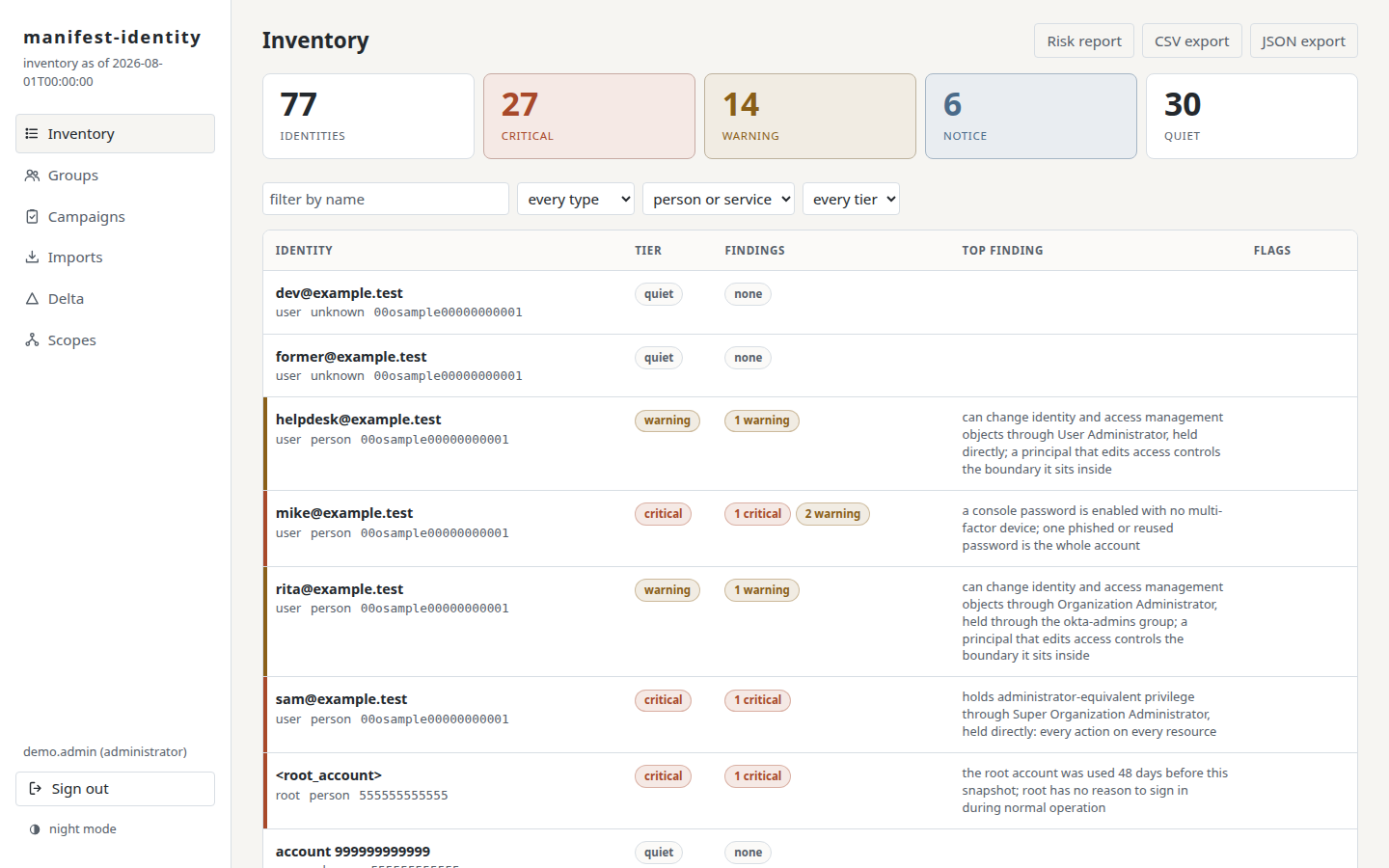
Quick start, with Docker as the only requirement:
git clone https://github.com/manifest-identity/manifest-identity.git && cd manifest-identity
cp .env.example .env   # fill in the four values it names
docker compose up -d
Then one command populates it end to end: the seven sample estates imported, the authorized record written as an administrator would have written it, and a review campaign open, safe to run twice:
docker compose exec app python -m manifest_identity.demo
Open http://127.0.0.1:8000, sign in with your administrator, and the inventory is live; Run it has the full path and the reasons behind each step.